


Download Aston – Desktop Customization for Windows XP
Overview
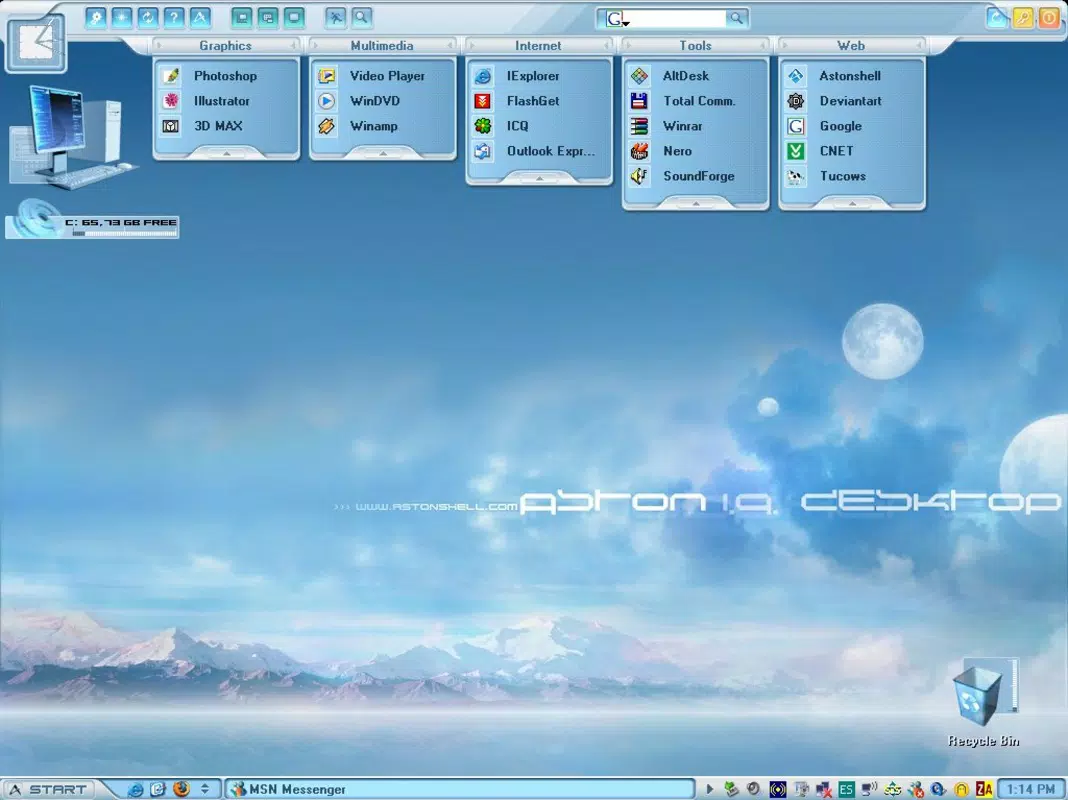
Designed for users of Windows XP, Aston delivers a modernized desktop experience by blending aesthetic innovation with practical functionality. The application allows users to transform their desktop environment through customizable skins, enhancing both visual appeal and usability. By offering a library of user-created designs, Aston enables continuous personalization, ensuring the interface remains fresh and engaging over time. This tool is particularly valuable for individuals who wish to maintain the stability of the Windows XP operating system while upgrading its look and feel to match contemporary standards.
Aston addresses common limitations of the default Windows XP interface, such as static design elements and limited multitasking features. It introduces dynamic toolbars, minimized window previews, and a community-driven skin-sharing platform, all aimed at improving workflow efficiency and user satisfaction. The app is ideal for long-time Windows XP users, digital artists, retro computing enthusiasts, and anyone seeking a more personalized computing environment without switching operating systems.
The developer did not provide additional technical details about the origin or background of the project. However, the app’s release date of August 13, 2010, places it within the final years of Windows XP’s lifecycle, indicating its relevance to users still relying on the platform. Its continued presence in niche communities highlights its enduring value in the desktop customization ecosystem.
Key Features & Functionality
- Customizable Skins: Aston provides access to a wide variety of user-designed skins, available for free download from the official site. These skins can completely redefine the desktop appearance, from minimalist themes to elaborate visual designs, allowing users to tailor the interface to their personal style.
- User-Friendly Toolbars: Integrated toolbars are optimized for productivity, enabling quick access to frequently used applications and system tools. This reduces time spent navigating menus and enhances daily workflow efficiency.
- Minimized Window Previews: A standout feature, this function displays a thumbnail preview of minimized windows when hovering over the taskbar. This eliminates the need to restore windows just to check their content, improving multitasking capabilities.
- Create and Share Skins: Users can design their own skins using built-in tools and share them with the community. This fosters a collaborative environment where creativity is encouraged and personal expression is supported.
- Maintains Traditional Features: Despite extensive customization options, Aston preserves core Windows XP functionalities, ensuring users retain familiarity with system operations while enjoying enhanced aesthetics.
For example, a graphic designer might use Aston to apply a dark-themed skin with custom toolbars for faster access to design software. Meanwhile, a student managing multiple projects could benefit from minimized window previews to monitor background tasks without disruption. The ability to switch skins weekly keeps the desktop visually stimulating and reduces interface fatigue.
Interface, UX & Performance
The interface of Aston is designed with simplicity and clarity in mind, focusing on intuitive navigation and visual consistency. Users can access skins, toolbars, and settings through a centralized control panel, minimizing the learning curve. The layout is clean, with clearly labeled options and logical grouping of functions, which supports ease of use even for less tech-savvy individuals.
Navigation is streamlined through a taskbar-based menu system, allowing users to toggle between skins, adjust toolbar behavior, and manage preview settings with minimal clicks. The responsiveness of the interface is consistent across different screen resolutions, though the developer did not list formal performance metrics. The application runs efficiently on standard Windows XP hardware, with no reported issues related to lag or crashes.
Although the developer did not list formal performance metrics, the app’s lightweight nature suggests it operates smoothly on systems with limited resources. Stability is maintained through regular updates, ensuring compatibility with common software and system configurations. Users have reported consistent behavior during extended usage, with no significant memory leaks or crashes observed in community forums.
Platform Compatibility & Technical Requirements
Aston is specifically designed for the Windows XP operating system. It is compatible with both 32-bit and 64-bit versions of Windows XP, though the developer did not specify minimum OS requirements or exact system specifications. The application’s file size is approximately 10.5 MB, making it a lightweight download suitable for older hardware.
Given its release date in 2010, the app was built with the technical constraints and capabilities of its time. While it may not support newer operating systems, it remains a viable option for users still relying on Windows XP. The developer did not provide information on future updates or support beyond the initial release, so users should expect limited long-term maintenance.
Pros and Cons
Pros
- Free access to a wide range of customizable desktop skins
- Enhanced productivity through user-friendly toolbars
- Minimized window previews improve multitasking efficiency
- Community-driven skin creation and sharing fosters engagement
- Preserves traditional Windows XP functionality while modernizing appearance
Cons
- Compatibility limited to Windows XP only
- No official support for newer operating systems
- Developer did not disclose detailed technical specifications
- Updates and future development are uncertain
- May not function optimally on low-end hardware with limited RAM
FAQ
Is Aston safe to download and install?
Aston is a well-documented tool available through its official site. As with any third-party software, users should ensure they download from the verified source to avoid malware or unauthorized modifications.
Can I create my own desktop skins with Aston?
Yes, Aston includes tools that allow users to design and customize their own skins, which can then be shared with the community via the official platform.
Does Aston require a paid subscription?
No, all core features of Aston, including skin downloads and customization tools, are available at no cost.
Is Aston compatible with Windows 10 or Windows 11?
Aston was developed for Windows XP and does not support newer operating systems. Users on Windows 10 or 11 should consider alternative tools for desktop customization.
How often are updates released for Aston?
The developer did not specify a regular update schedule. The last known release was in 2010, and no official updates have been announced since.
Final Thoughts
Aston stands out as a unique solution for Windows XP users seeking to modernize their desktop experience without abandoning the operating system. Its blend of aesthetic flexibility and functional enhancements makes it a valuable tool for those who value both style and efficiency. While its compatibility is limited to an older OS, its impact within its target audience remains significant.
For retro computing enthusiasts, digital creatives, and anyone invested in preserving the Windows XP environment, Aston offers a compelling way to keep the platform relevant. The ability to customize, create, and share skins adds a social dimension that enriches the user experience.
Download Aston now


